Open source · MIT licensed · Free forever

Your financial outlook.
Secure. Local. Accessible.

Every finance app monetizes your transactions. We built the opposite — track spending, find forgotten subscriptions, catch unusual charges, all from your machine. No cloud. No tracking.

You are not the product.

$ pip install getfin
Python 3.12+ · Free & open source
Security posture →
No cloud No telemetry No accounts Encrypted backups
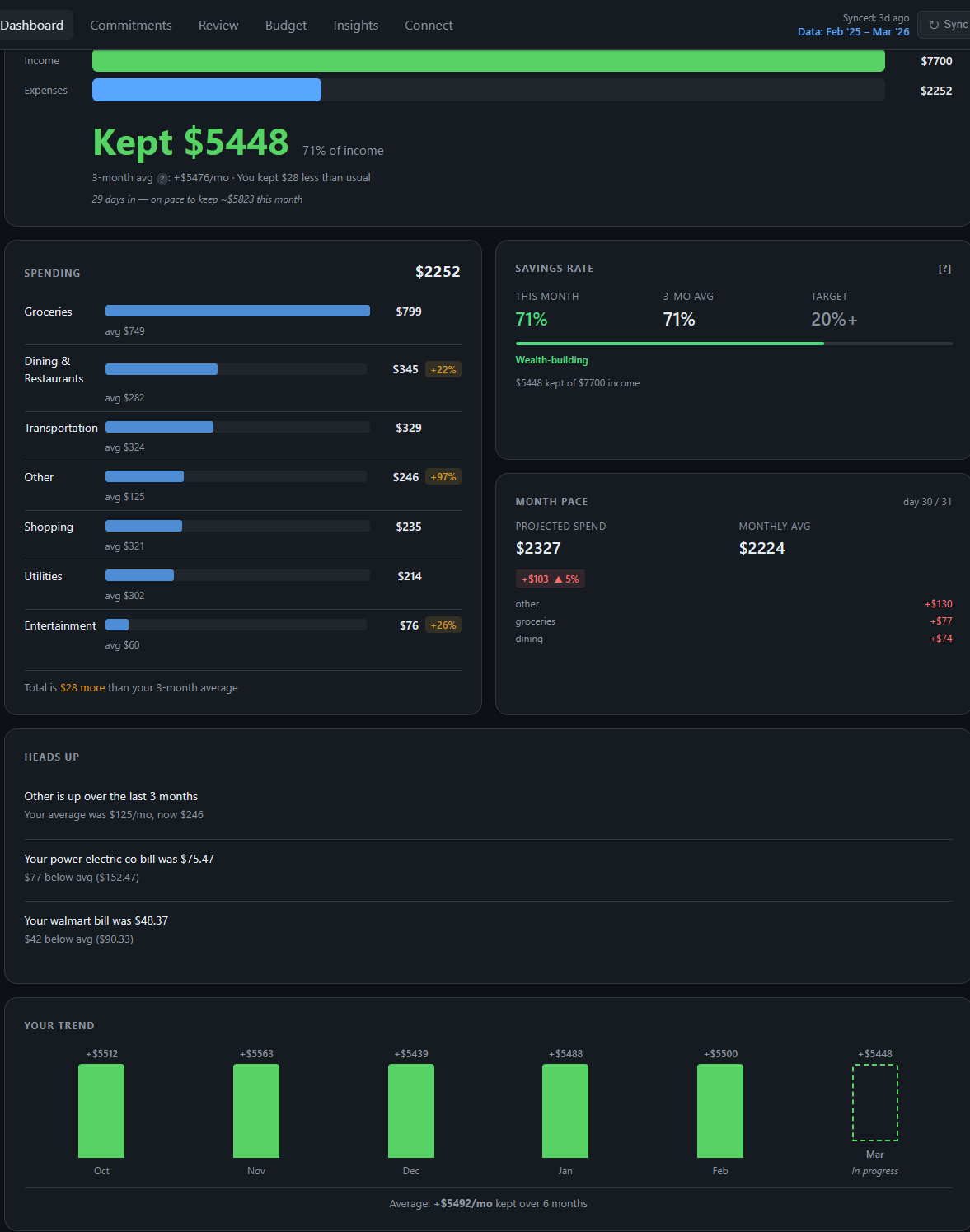
Fin dashboard showing cash flow, spending breakdown by category, savings rate, and month-over-month trend
What you get

See the full picture. Keep full control.

Everything runs on your machine. Every feature works offline. Your financial data never touches someone else's server.

Web dashboard at localhost

Cash flow, spending breakdown, subscription commitments, alerts, and 6-month trends — all in a local web UI. Click into any number to drill down.

Find forgotten subscriptions

150+ services recognized instantly. Pattern detection catches the rest from 3+ recurring charges. Know exactly what you're paying for.

Netflix Spotify Disney+ Adobe CC Microsoft 365 ChatGPT 1Password iCloud +140 more

Catch unusual charges

Duplicate charges, price increases, bundle overlap (Disney+/Hulu/ESPN+ stacking). Problems surfaced before they grow.

See where every dollar goes

Auto-categorized transactions with 3-month rolling averages. Outlier badges flag unusual months so you spot problems early.

Full CLI for power users

Everything the dashboard does, from the terminal. Sync, analyze, export, audit. Script it, cron it, pipe it.

Bank sync built in

Connect via SimpleFIN for automatic daily sync, or drag-and-drop CSV exports from Chase, BofA, Amex, Wells Fargo, Capital One.
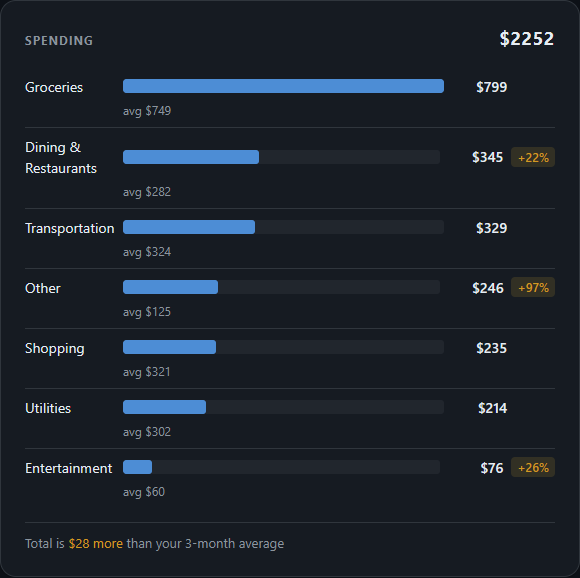
Spending breakdown card showing top categories with amounts and percentages
Spending breakdown by category
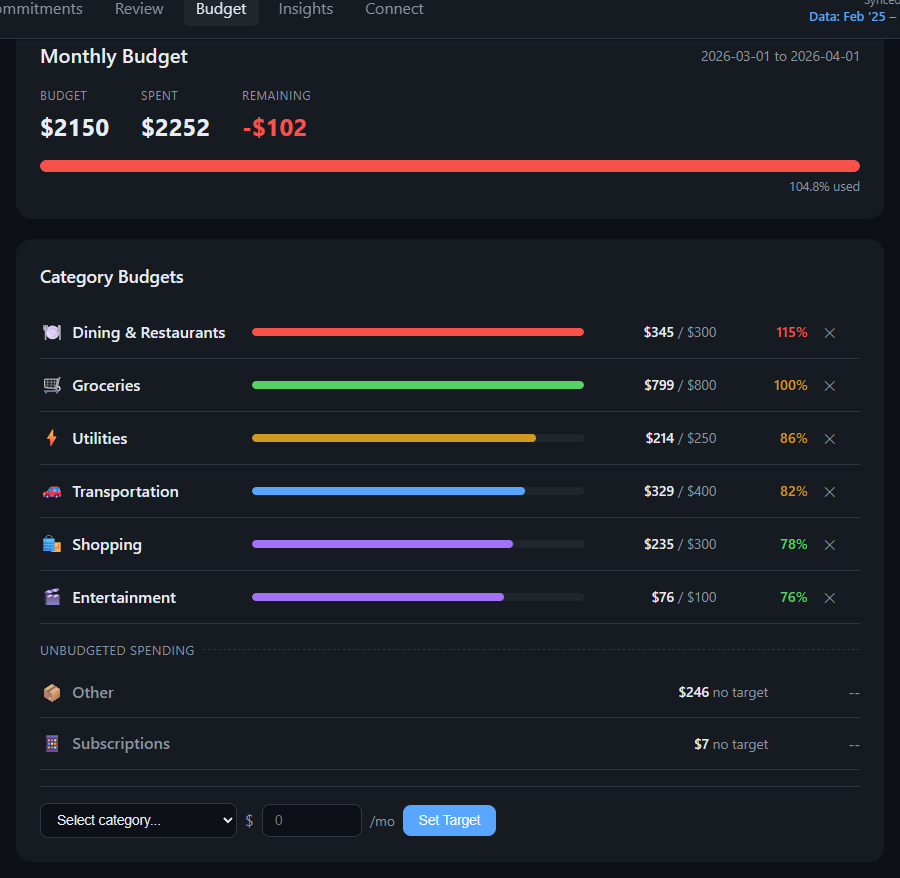
Budget tracking with colored progress bars showing spending against monthly targets per category
Set budget targets. Track progress in real time.
Get started

Running in 5 minutes.

One command to install. One command to launch.

01

Install

pip install getfin

02

Connect your bank

Import a CSV or link SimpleFIN for automatic daily sync

03

Open the dashboard

fin web opens a full dashboard in your browser — no account needed

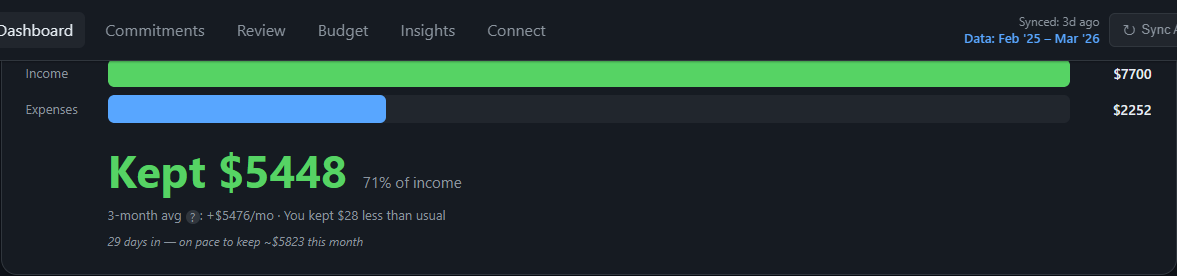
Cash flow summary showing income vs expenses for the current month

What you see after fin web

Security model

Your data never leaves your machine.

We eliminate entire threat categories by design. Where we handle sensitive data, we delegate to proven, audited tools — not homebrew crypto. Every layer is something you can independently verify.

What we don't do

  • Cloud storage
  • Remote API calls
  • User accounts or login tokens
  • Session cookies
  • Telemetry or analytics
  • Phone home — ever

What we delegate

  • Credentials → OS keyring
  • Backup encryption → age (ChaCha20-Poly1305)
  • Disk encryption → BitLocker / FileVault / LUKS
  • TLS → Python cryptography library
  • We didn't build our own — that's the point
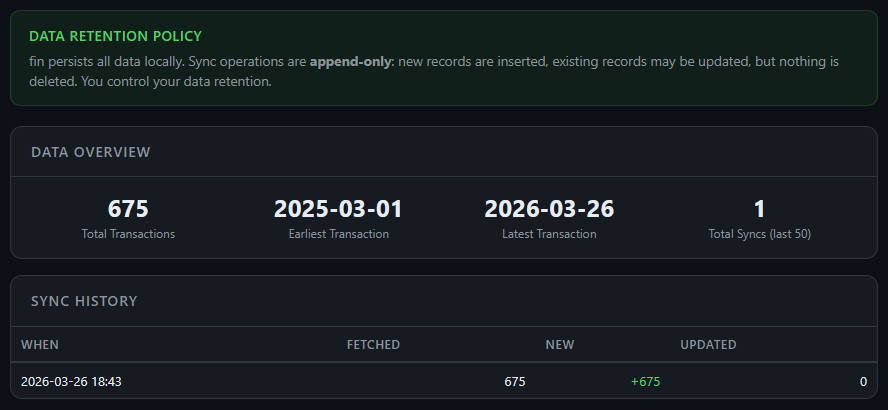
Data retention policy, 675 transactions tracked, and sync history showing append-only audit trail

Full audit trail. Every sync logged. Append-only by design.

Install

Choose your path.

PyPI

# Install
pip install getfin

# Launch dashboard
fin web

Docker

docker compose build
docker compose run --rm fin sync
docker compose run --rm fin web

From source

git clone https://github.com/arclighteng/fin.git
cd fin && python -m venv .venv
source .venv/bin/activate  # .venv\Scripts\activate on Windows
pip install -e . && fin web

Connect your bank

CSV import

Download a transaction export from your bank and drag it onto the import page. Automatic format detection for Chase, BofA, Amex, Wells Fargo, Capital One.
SimpleFIN

Automatic daily sync. SimpleFIN Bridge (~$1.50/month) — link your bank, paste the setup token into fin.